Nonlate combines tasks you add yourself with deadlines synced from school, calendar, to-do, and work apps. If you open a chosen distraction while work is due, Nonlate shows the blocker first.
Choose which distracting apps to protect. When one opens, Nonlate checks unfinished due work and shows the blocker only when something needs your attention.
01
Work is due
Manual and synced tasks are overdue or due soon.
02
You open a distraction
Example: Moments, an app you chose to protect.
03
Nonlate checks
Finds 3 unfinished tasks that match your due-work settings.
04
Blocker appears
iOS shows its shield; Android shows the fuller task blocker.
One connected system
From scattered deadlines to a day you can act on.
The same manual and synced tasks power your due-work list, Planner, Schedule, Can’t Miss Alarms, widgets, Focus Pulse, and blocker.
01 · DUE WORK
One place for what’s due.
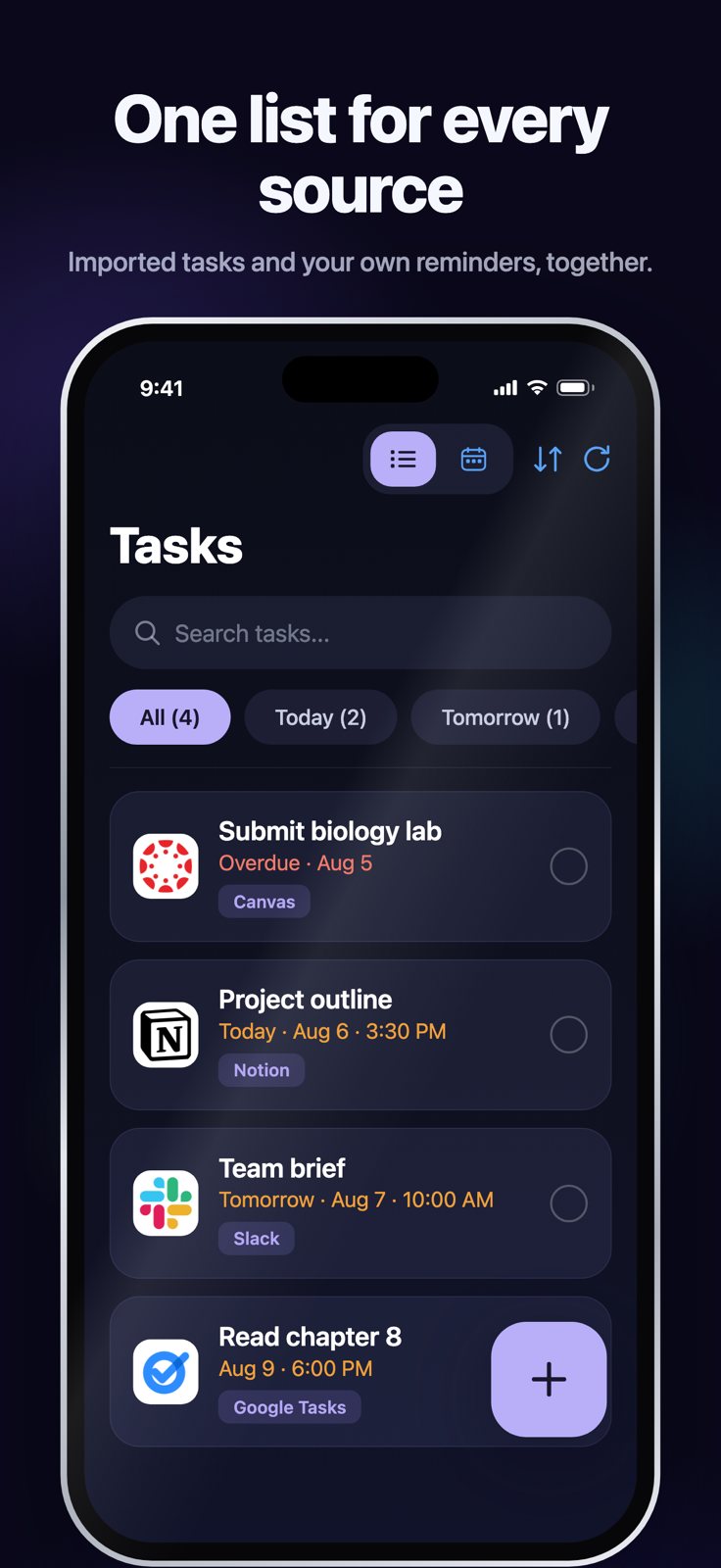
Tasks you add manually and tasks synced from integrations appear in one list, with overdue work first and upcoming deadlines ordered by urgency.
Submit biology labCanvasOverdue
Project outlineNotionDue in 2h
Team briefSlackDue today
02 · PLANNER
Choose a day for the work.
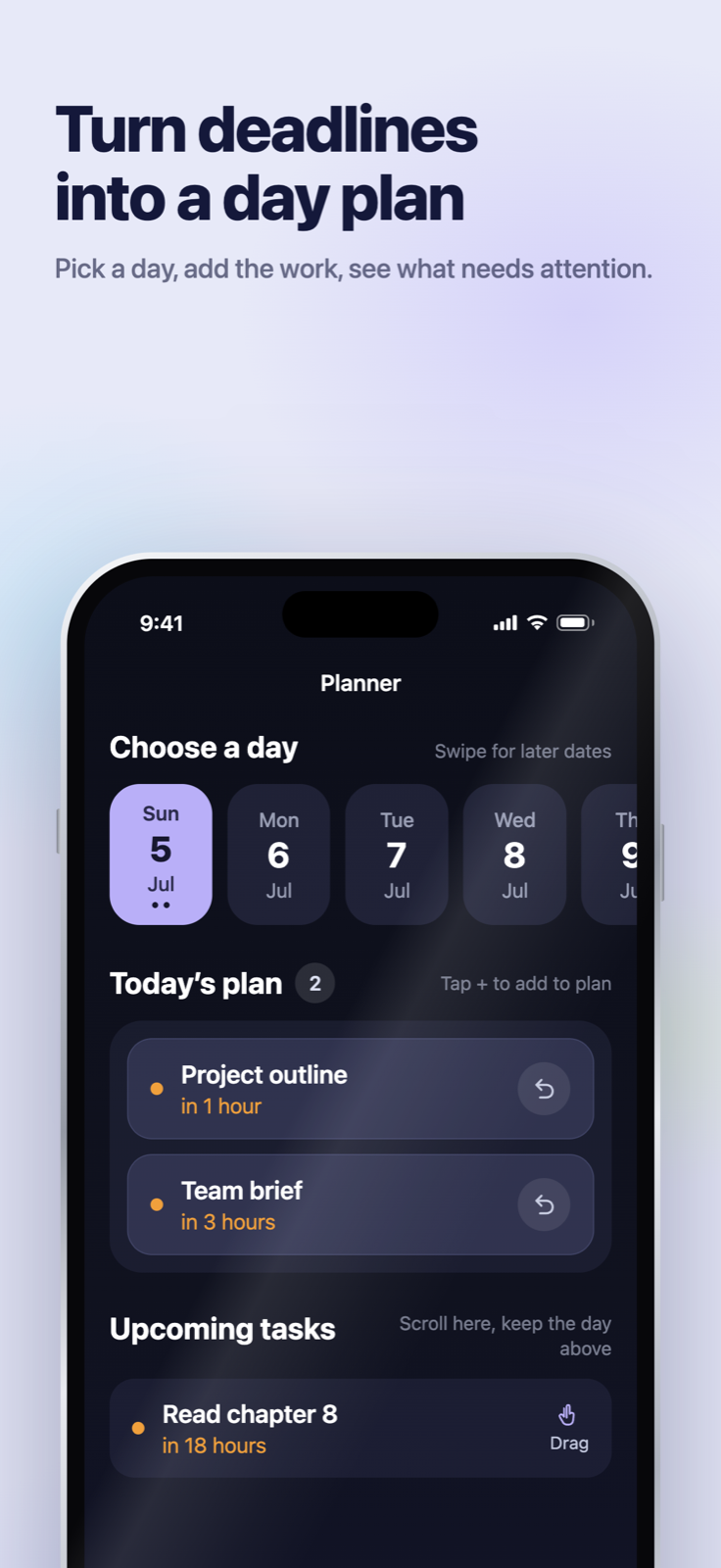
Pick a day, add due tasks to that day’s plan, and see upcoming work that still needs scheduling.
Choose a daySwipe for later dates
Sun5Mon6Tue7Wed8
Today’s plan 2Tap + to add to plan
Project outlinein 1 hour↩
Team briefin 3 hours↩
Upcoming tasksKeep the day above
Read chapter 8in 18 hoursDrag
03 · SCHEDULE
See the whole day in order.
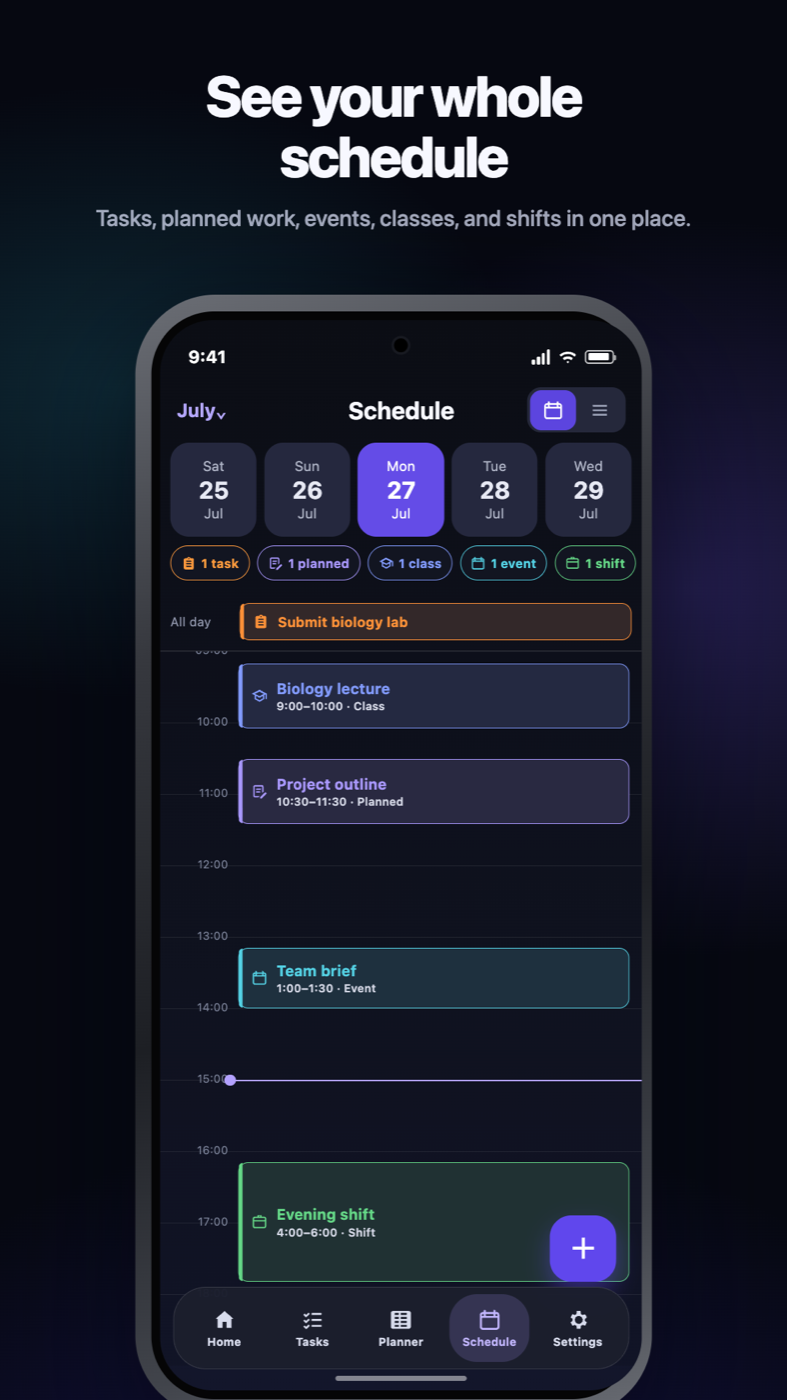
Schedule places work from Planner alongside due tasks, calendar events, classes, and shifts on one timed timeline.
Tue5Wed6Thu7Fri8
9 AMBiology lab
11 AMProject outline
2 PMTeam brief
04 · APP PROTECTION
Choose what gets interrupted.
Choose which distracting apps Nonlate can interrupt. When one opens, Nonlate checks for unfinished due work and shows the blocker only when something needs attention.
Nonlate
05 · CAN’T MISS ALARM
Set an alarm you can’t miss.
Attach an alarm to a task or scheduled item and choose the time. Nonlate then uses the strongest alarm presentation your device supports.
TASK · HISTORY ESSAY DRAFT9:00MONDAY · 8:00 AM
06 · AT A GLANCE
Keep the next deadline in sight.
Widgets show your next task, today’s plan, or the coming week without opening Nonlate. Supported iPhones also use Live Activities and Dynamic Island for active countdowns.
NONLATE · DUE SOONBiology lab10:08BREAK ACTIVEBlocking resumes09:55
Deadline-aware blocking
The blocker is the product.
When a selected distraction opens, Nonlate checks unfinished tasks that are overdue or inside your chosen due window. Calendar events can appear in Schedule, but they never trigger the blocker.
Core experience
Block distracting apps when work is due.
The blocker shows the work that made it appear, with overdue tasks first and upcoming work next. It then offers the task or timed-break actions supported by that platform.
Deadline context, not a generic wall
Optional setting
Focus Lock
Focus Lock removes the quick-break choice from the blocker. To take a break, return to Nonlate, pause for a short reflection, and then start the configured timer.
Stronger break control
Integrations
Connect the tools already holding your responsibilities.
Connect the school, calendar, to-do, and work services you already use. Supported tasks and due dates join the same list as manual tasks, so you do not have to enter them twice.
Google TasksTodoistTickTickMicrosoft To DoApple RemindersiOS
Work & projects
NotionAsanaMonday.comTrelloClickUpGitHub IssuesLinearJiraSlackMicrosoft PlannerMicrosoft Teams
Source availability, permissions, and sync speed vary by provider, platform, and plan. Imported calendar events appear in Schedule, but they are not due tasks and never trigger blocking.
Current builds
Real screens. Platform-native details.
These are current iOS and Android screens. Planner assigns work to a date or session; Schedule places that work beside tasks, events, classes, and shifts in one timed view.
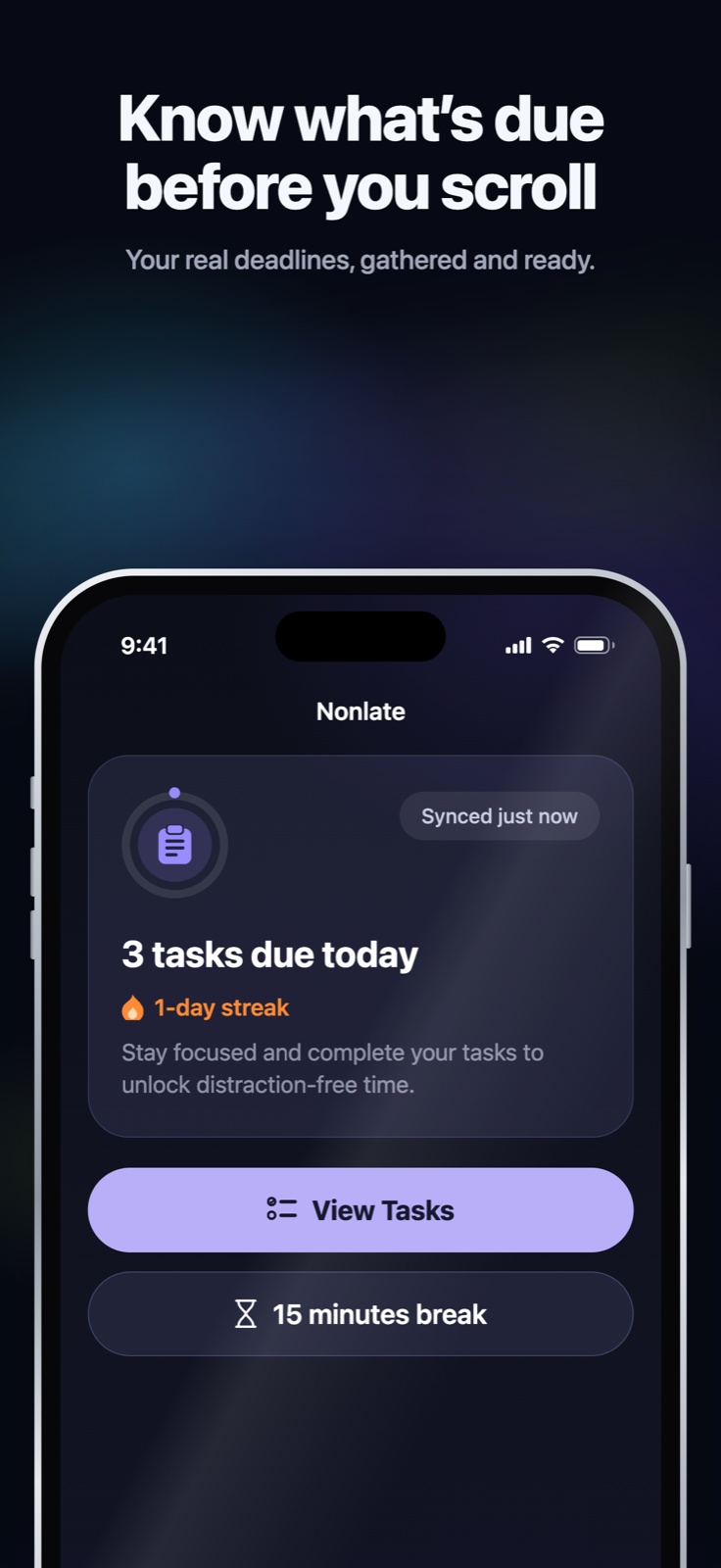
iOSHome · due tasks
iOSTasks · every source
AndroidBlocker · work due
iOSPlanner · choose a day
AndroidSchedule · timed day
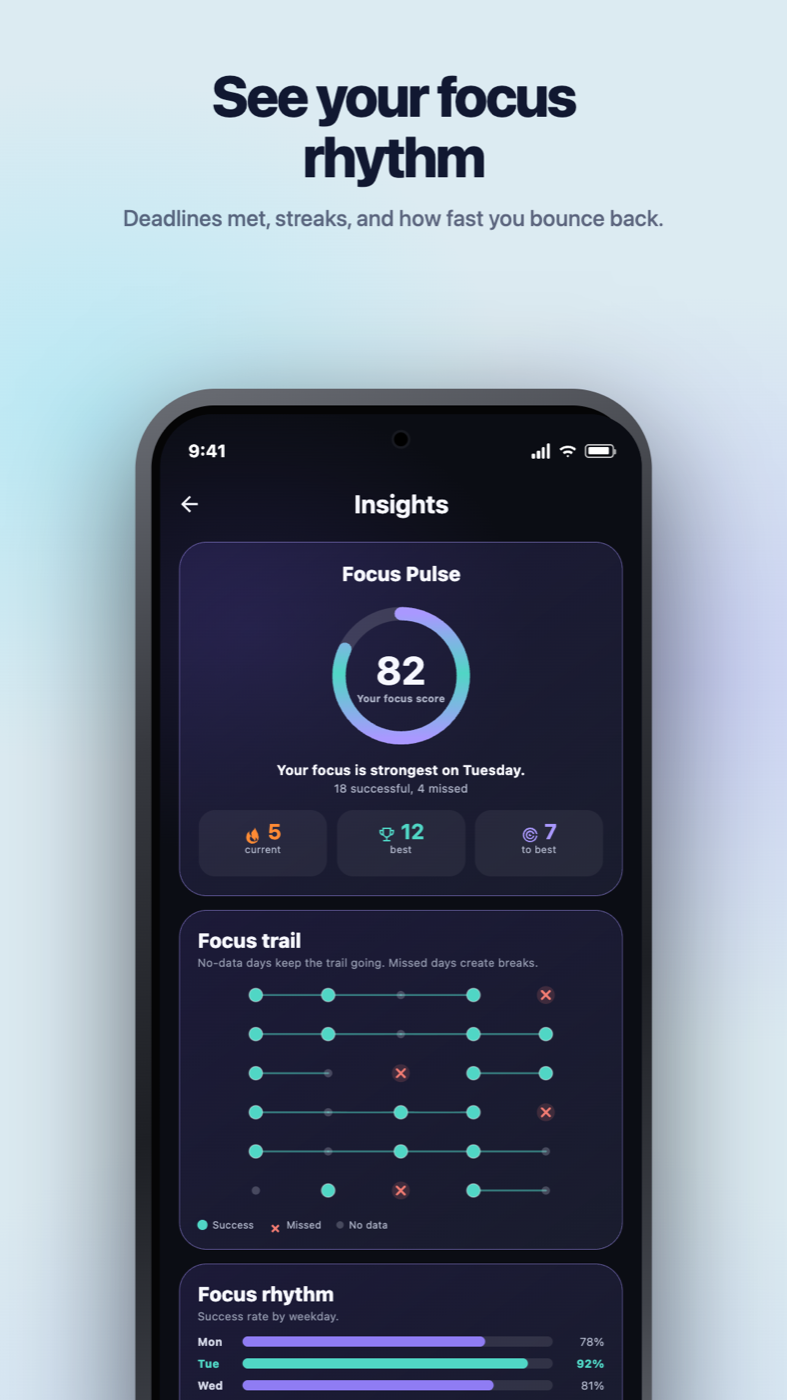
AndroidInsights · Focus Pulse
Personal by design
More human than a wall of statistics.
Choose what the blocker says and how Nonlate looks, then use Focus Pulse to understand how consistently you finish due work on time.
01
Choose the message that stops you.
On supported blocker screens, use the standard deadline prompt, write a custom message, or rotate Daily Wisdom in the tone you need.
TODAY’S MESSAGE
“Start smaller than your excuses.”
Daily wisdom · Calm
02
See your Focus Pulse.
See on-time and missed due-work days, current and best streaks, your strongest weekdays, and how quickly you get back on track after a miss.
82FOCUS PULSE
5 current12 best1.4d recover
03
Make focus feel yours.
Choose one of 12 built-in themes or create custom colors. Your selected theme carries through the app and supported widgets.
AuroraBloomSageBoring
+8 more themesCustom colors too
A plan for every level of focus
Start simply. Add friction when you need it.
Every plan is ad-free, with no Nonlate account required. Try one external source free for 30 days and protect up to three distracting apps. Paid plans add more sources, background sync, broader blocking, customization, and insights.
The essentials
Free
$0
✓Try 1 external source at a time for 30 days
✓Up to 3 protected apps
✓Source sync on open or refresh during the trial
✓Manual tasks and core blocking stay free
✓On-device calendars and reminders stay free
✓Ad-free, with no automatic trial charge
Choose your plan in the app
Best for most people
Best for most people
Plus
$5.99 / monthor $59.99 / year, billed annually
✓Up to 3 connected sources
✓Hourly background sync when available
✓Unlimited app blocking plus supported websites and categories
✓Widgets, themes, and extended insights
✓Custom intercept messages
Choose your plan in the app
Everything connected
Pro
$11.99 / monthor $99.99 / year, billed annually
✓Unlimited connected task sources
✓Live Sync for supported integrations
✓Trello connection and sync
✓Provider-dependent updates within sync limits
✓Everything in Plus
Choose your plan in the app
Prices shown are USD reference prices. Your app store displays the current localized price and billing period before purchase; prices and availability may vary by region and platform. Paid subscriptions renew automatically unless cancelled through the purchasing store. Features and sync timing vary by provider and device.
The source trial starts after your first successful connection, has no automatic charge, and does not restart when you switch sources. After 30 days, external syncing pauses; imported tasks remain available for local completion and blocking. Manual tasks and on-device calendars and reminders stay free.
Privacy by design
Connected data is for your deadlines.
Nonlate processes task and calendar details only for services you choose to connect, stores credentials using platform-secure storage, and lets you disconnect sources or request deletion.
HTTPS/TLS in transit, Keychain on iOS, and Keystore-backed encrypted preferences on Android.
02
Limited use of Google data
Google task and calendar data is used only to provide connected sync and Nonlate features, not advertising or generalized AI training.
03
Your connections stay reversible
Disconnect a source in Nonlate settings or request deletion through support at any time.
Questions, answered plainly
Before Nonlate steps in.
The important details without the productivity theater.
What happens when I open a blocked app?+
When you open an app you chose to protect, Nonlate checks unfinished tasks that are overdue or inside your due window. If matching work exists, it shows the iOS or Android blocker with the actions available on that platform. Focus Lock removes the quick-break option and adds a reflection step before a timed break.
Does Nonlate replace my task apps?+
No. Synced tasks stay connected to their original service, while tasks you create in Nonlate are manual tasks. Nonlate brings both into one due-work list, then uses that list in Planner, Schedule, widgets, alarms, insights, and blocking.
Do calendar events trigger blocking?+
No. Calendar events can appear beside planned work, tasks, classes, and shifts in Schedule, but only unfinished due tasks participate in deadline-aware blocking.
Does every integration update instantly?+
No. During the source trial, Free syncs one external source when you open Nonlate or refresh. Plus supports hourly background sync, and Pro adds Live Sync for supported integrations within sync limits. Timing depends on provider permissions, device background limits, and service availability. Live Sync is not guaranteed for every provider or account role.
Does blocking work identically on iOS and Android?+
No. Both platforms check due work before selected distractions, but the operating systems allow different presentations. iOS uses Apple Screen Time shields. Android uses Accessibility only to detect when a selected app opens and can show a fuller blocker with task details.
When can I download it?+
Nonlate is available on the Mozambique App Store. Android is coming soon; closed-test access is not the same as public availability. Store availability may vary by country. The download link opens the verified Mozambique listing.
What stays free after the source trial?+
Manual tasks, on-device calendars and reminders, and blocking up to three distracting apps stay free. The 30-day trial starts after your first successful external-source connection and permits one external source at a time. Switching sources does not restart the window. When it ends, external syncing pauses, but imported tasks remain available for local completion and blocking. The source trial has no automatic charge and is separate from any subscription introductory offer. Paid access resumes syncing within the purchased plan’s limits.
Do I need a Nonlate account, and are there ads?+
No Nonlate account is required, and every plan is ad-free. Connecting a source may require signing in to that provider and granting its requested permissions. Paid subscriptions are optional, billed through your app store, and renew automatically unless cancelled through that store.
Be on time. Gently.
Put the deadline before the distraction.
Built for school, work, and everyday life. Ad-free, with no Nonlate account required. Download on the Mozambique App Store; Android public availability is coming soon.

 synced now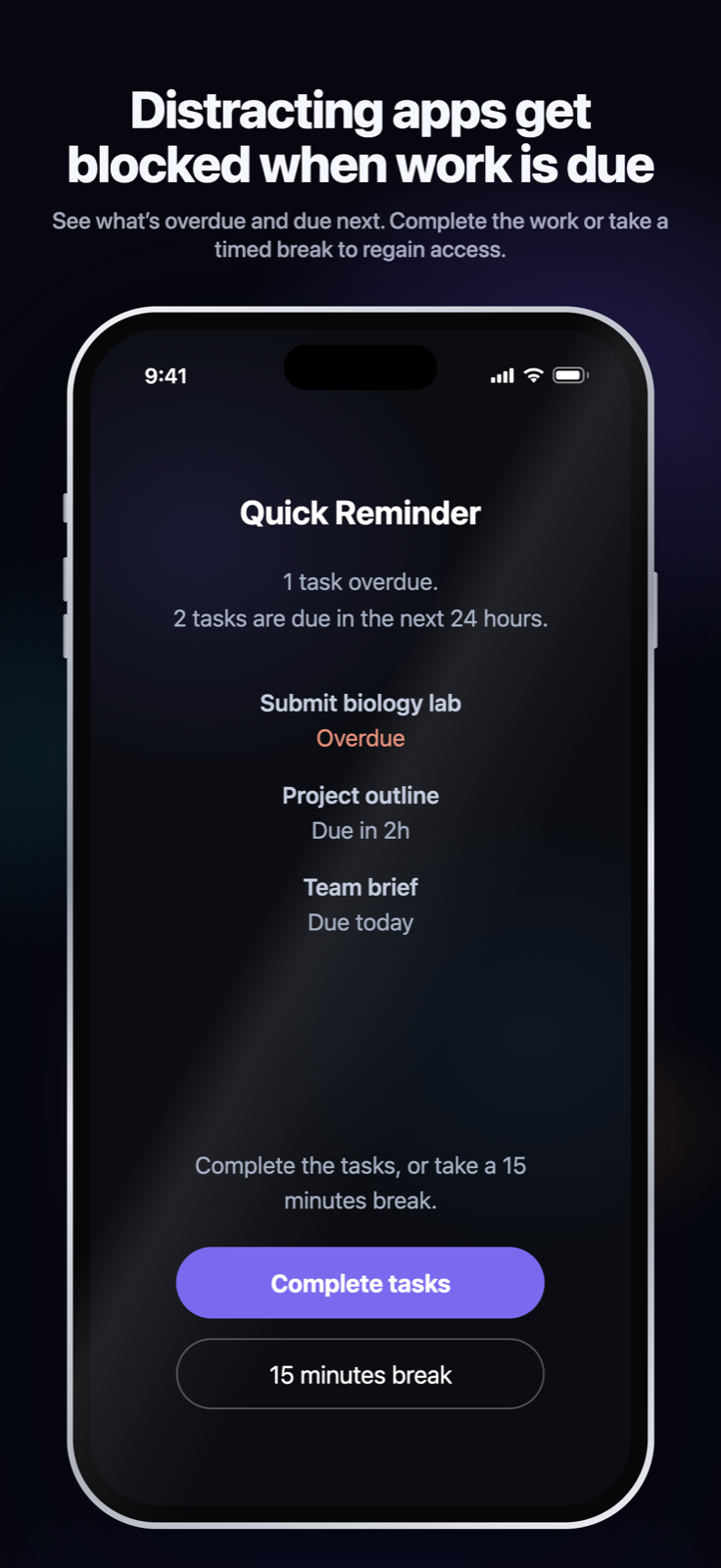
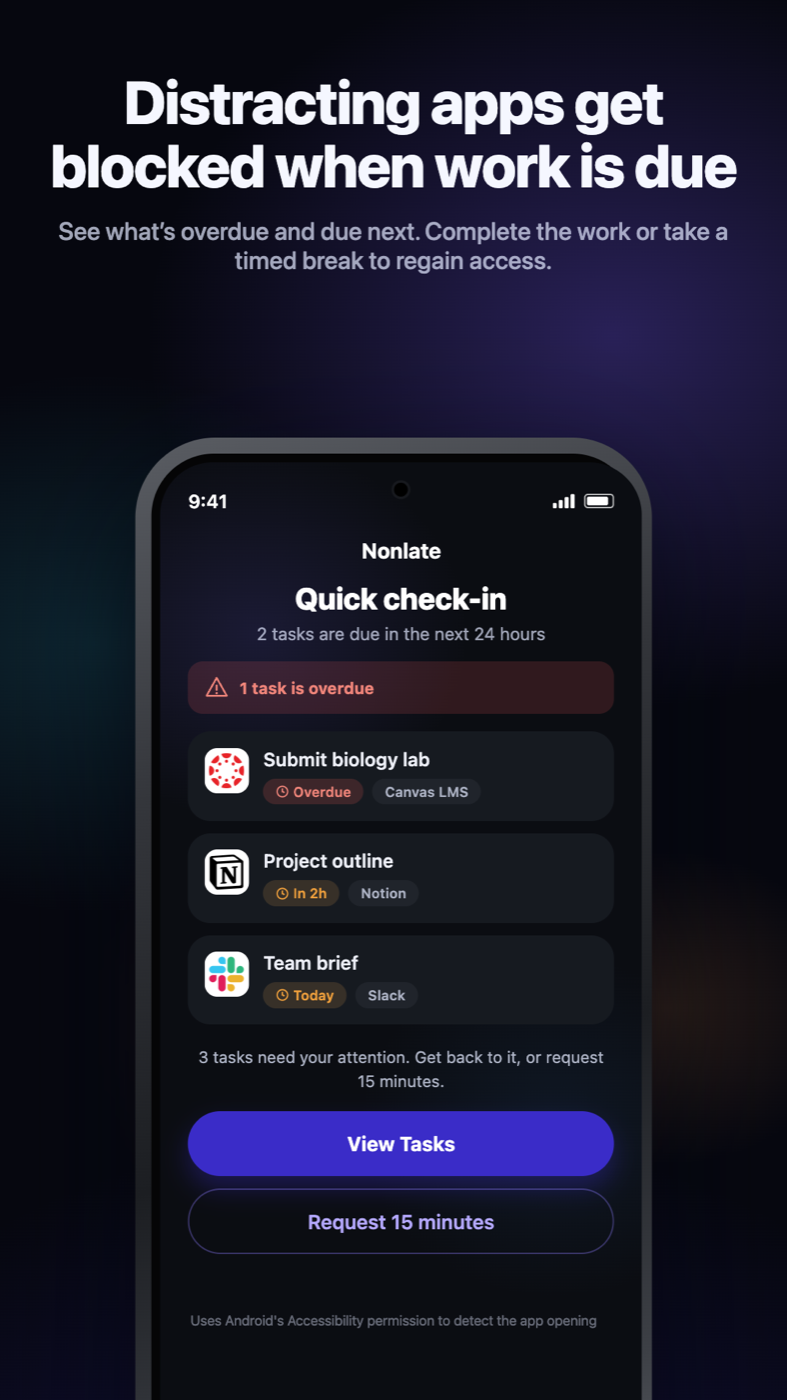


 Submit biology labCanvasOverdue
 Project outlineNotionDue in 2h
 Team briefSlackDue today